
If you are anything like me, you are taking hundreds of photos each month documenting your life and the people in it. The question is what happens next. If we want to print and enjoy our images, we first need to know where they live and how to find them.
For me, organization begins with culling.
Culling What You Keep
Culling is the process of deciding which images to keep and which ones can be deleted. This used to feel difficult for me because digital storage feels unlimited. But keeping everything makes it harder to find the images that truly matter.
When I look through photos, I keep the best version of a moment. If I took ten photos of my son blowing out birthday candles, I ask which ones are in focus. Are his eyes open. Is there a duplicate that adds nothing new. Those are the images I delete. Saving only your favorites makes everything else easier later.
Culling Phone Images
Trying to go through thousands of phone images in one sitting is overwhelming. Instead, I look for small pockets of time. A few minutes in the carpool line. While waiting for an appointment. Sitting on the couch at the end of the day.
Ten minutes goes further than you think. Small, consistent efforts keep things manageable.
Culling Camera Images
For images from my camera, I copy everything from my memory card onto a hard drive and cull from there. Deleting images directly from your camera can cause issues over time, and it is much faster to work on a computer.
I personally use Photo Mechanic because it allows me to move quickly without waiting for images to load. The less time I spend at my computer, the more time I have with my family.
Creating a Simple Organization System
All of my personal images live on external hard drives. Large photo files can slow down a computer quickly, so I prefer to store them separately.
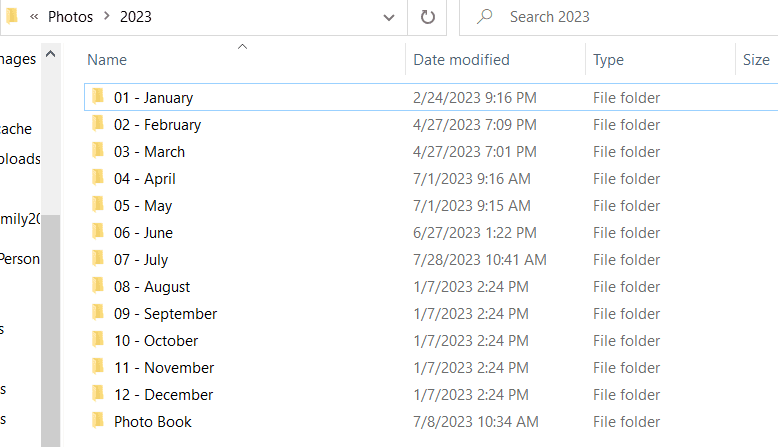
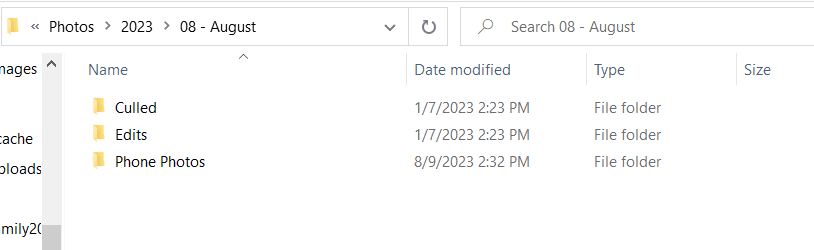
I organize my images by year, then by month. Inside each month, I have folders for phone photos, culled camera images, and final edits. This system works for me, but it may not be the right fit for everyone.
I have tried organizing by seasons and by activities, and both became messy fast. Everyday life does not always fit into neat categories. The best system is one you will actually use.
Set up your folders moving forward and do not worry about organizing older images all at once. That can be done slowly over time.
Today’s Takeaway
Find a few minutes to delete images you do not need. Decide on a simple folder structure and start using it today. Progress matters more than perfection.
Read the rest of the Heritage Series here:
Part 1: How to Take, Organize, and Print your Personal Photographs
Part 4: Backing Up and Protecting Your Photos: Family Heritage Series





+ COMMENTS
add a comment